

Fixing Zephyr Bluetooth LE Connection Timeout Issues
October 10, 2026
8 min
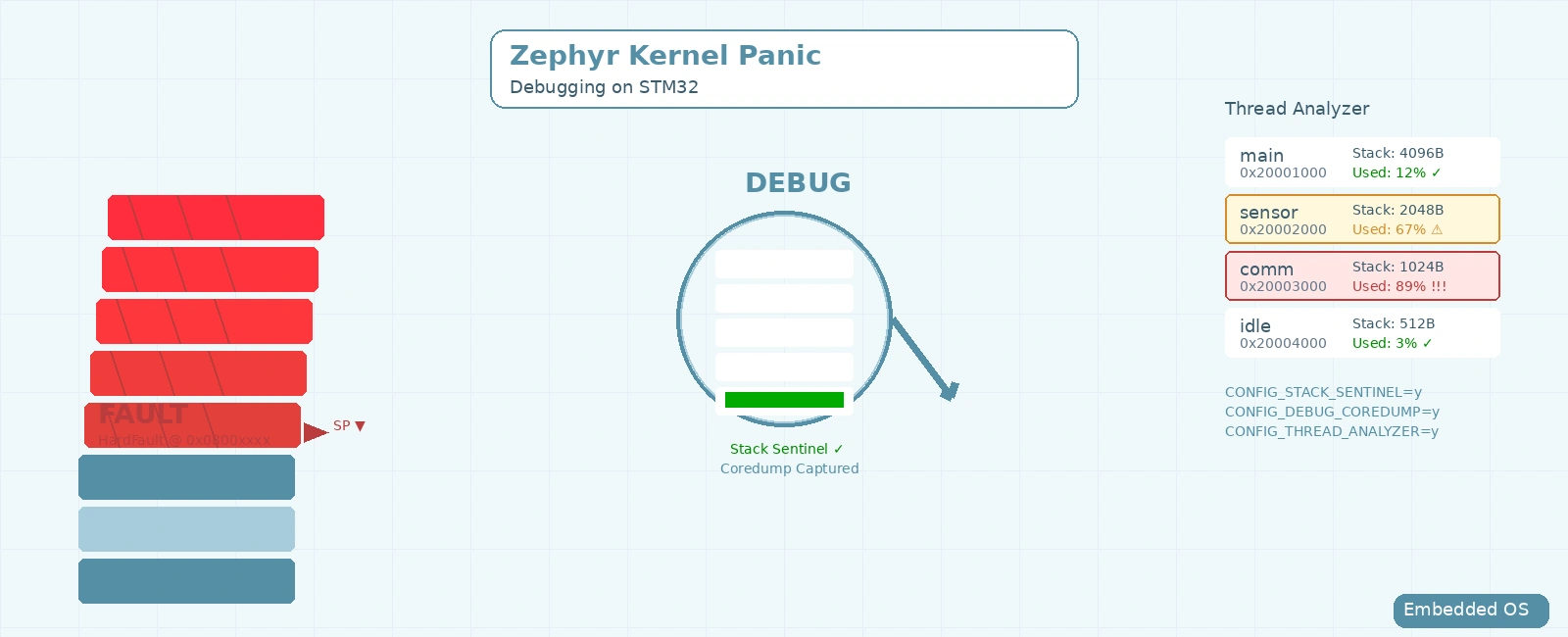
+------------------------------------------------------------------------+| ZEPHYR THREAD STACK & FAULT LAYOUT (ARM CORTEX-M) || Stack Grows Downward (High Addr -> Low Addr) |+------------------------------------------------------------------------+| HIGH ADDRESS || || Initial Thread Stack Pointer (PSP) || +--------------------+ || | Initial Arch Frame | || | (Thread Entry Regs)| || +--------------------+ || || +--------------------+ || | Thread Call Frames | || | & Local Variables | || +--------------------+ || || +--------------------+ || | Exception Frame | <--- HW auto-stacks || | (R0-R3,R12,LR,PC, | R0-R3, R12, LR, || | xPSR, [FPU Regs]) | PC, xPSR on PSP || +--------------------+ || | || v STACK GROWS DOWNWARD || || +--------------------+ || | Usable Stack Space | || | (Monitored via | || | stack_space_get) | || +--------------------+ || || === CRITICAL OVERFLOW BOUNDARY === || || +--------------------+ || | Guard Region | || | - MPU No-Access | || | (HW Protection) | || | - Canary Word | || | (Stack Sentinel) | || +--------------------+ || || LOW ADDRESS || Stack Buffer Base (K_THREAD_STACK_DEFINE) || || * Note: On Cortex-M, ISR handlers & nested ISRs execute on MSP || (Interrupt Stack), NOT on thread PSP. Only the HW frame is on PSP. |+------------------------------------------------------------------------+
Kernel panics in Zephyr on STM32 microcontrollers can halt your embedded system unexpectedly, leaving you with a cryptic error message and a dead board. This guide walks you through diagnosing the root causes—from stack overflows to ISR missteps—and provides actionable fixes to restore stability.
You’ve deployed your Zephyr-based STM32 application, and after running for hours or days, the system suddenly resets. The console output shows something like:
[00:00:00.000,000] <err> os: ***** HARD FAULT *****[00:00:00.000,000] <err> os: Fault escalation (see below)[00:00:00.000,000] <err> os: ***** BUS FAULT *****[00:00:00.000,000] <err> os: Precise data bus error[00:00:00.000,000] <err> os: BFAR Address: 0x20020000[00:00:00.000,000] <err> os: r0/a1: 0x00000000 r1/a2: 0x00000000 r2/a3: 0x00000000[00:00:00.000,000] <err> os: r3/a4: 0x00000000 r12/ip: 0x00000000 r14/lr: 0x00000000[00:00:00.000,000] <err> os: xpsr: 0x00000000[00:00:00.000,000] <err> os: Faulting instruction address (r15/pc): 0x08001234[00:00:00.000,000] <err> os: >>> ZEPHYR FATAL ERROR 0: CPU exception on CPU 0[00:00:00.000,000] <err> os: Current thread: 0x20001234 (my_thread)
This is a kernel panic—a fault the Zephyr kernel cannot recover from. For senior firmware engineers, this translates to downtime, frustrated users, and urgent debugging sessions. Understanding why this happens and how to fix it is critical for reliable embedded systems.
Zephyr’s kernel panics are typically triggered by hardware faults that the CPU traps and the kernel handles as fatal. Common causes on STM32 include:
When a thread’s stack grows beyond its allocated space, it corrupts adjacent memory, often leading to a hard fault. Zephyr provides stack sentinels (CONFIG_STACK_SENTINEL) to detect this, but without them, the overflow may go unnoticed until it corrupts critical data.
Accessing memory via a null pointer (e.g., due to an uninitialized pointer or failed memory allocation) triggers a Bus Fault or Hard Fault. On many STM32 devices, address 0x00000000 is aliased to flash, so a null read may silently succeed—only writes will fault. Enable CONFIG_NULL_POINTER_EXCEPTION_DETECTION_MPU so Zephyr programs an MPU region at address zero, turning any null access into an immediate MemManage fault. In ISRs or threaded code, null pointer issues often arise when a peripheral driver returns an error that isn’t checked.
Interrupt Service Routines (ISRs) must execute rapidly and never yield to the scheduler. Invoking blocking APIs (such as k_sem_take(&sem, K_FOREVER), k_mutex_lock(), or k_sleep()) from interrupt context is strictly forbidden. When CONFIG_ASSERT=y is enabled, Zephyr’s internal k_is_in_isr() guard checks trigger an immediate assertion failure and kernel panic (K_ERR_KERNEL_PANIC). Without assertions enabled, the behavior is undefined—the system may silently corrupt scheduler state, deadlock, or eventually hard fault.
The STM32’s MPU restricts memory access. In Zephyr, enabling features like CONFIG_HW_STACK_PROTECTION or CONFIG_USERSPACE programs the MPU. A fault here often means a thread attempted to write to flash, execute from RAM (if non-executable), or overflowed a hardware-protected stack boundary.
Local arrays or structs on the stack that are written beyond their bounds (e.g., via sprintf without bounds checking) can overwrite return addresses or other thread state.
Start by turning on build-time diagnostics:
CONFIG_STACK_SENTINEL: Places a canary word at the bottom of each thread stack; if the canary is found corrupted during a context switch or tick interrupt, the kernel panics with a clear message. Note: this option is mutually exclusive with CONFIG_HW_STACK_PROTECTION—use one or the other.CONFIG_DEBUG_COREDUMP: Saves the state of the faulting thread to memory for later analysis.CONFIG_LOG: Enables logging to capture events leading up to the panic.CONFIG_ASSERT: Includes runtime checks that can catch invalid parameters early.Add these to your prj.conf:
CONFIG_STACK_SENTINEL=yCONFIG_DEBUG_COREDUMP=yCONFIG_LOG=yCONFIG_LOG_DEFAULT_LEVEL=3CONFIG_ASSERT=y
When a panic occurs with core dump enabled, Zephyr stores the faulting thread’s context. You can retrieve it via a debugger or by implementing a custom coredump reader. Look for:
r15/pc)ZEPHYR FATAL ERROR)Precise data bus error)Look at the Zephyr fatal error reason code (e.g., ERROR 0: CPU exception) to determine the fault type. Standard Zephyr fatal errors include:
0 (K_ERR_CPU_EXCEPTION): CPU exception (Hard fault, Bus fault, Usage fault).1 (K_ERR_SPURIOUS_ISR): Spurious interrupt.2 (K_ERR_STACK_CHK_FAIL): Stack overflow or corruption detected.3 (K_ERR_KERNEL_OOPS): Kernel oops (software-triggered fatal error).4 (K_ERR_KERNEL_PANIC): Unrecoverable kernel panic.For CPU exceptions, Zephyr will parse the ARM Cortex-M Fault Status Registers (CFSR, HFSR) and dump human-readable reasons, such as Precise data bus error or Instruction access violation.
If stack sentinel triggers, increase the stack size for the offending thread. In Zephyr, define stack size in the thread definition:
K_THREAD_DEFINE(my_tid, 2048, my_thread, NULL, NULL, NULL, MY_PRIORITY, 0, K_NO_WAIT);
Monitor remaining runtime stack headroom using k_thread_stack_space_get(&my_tid, &unused_bytes) (which requires CONFIG_INIT_STACKS=y and CONFIG_THREAD_STACK_INFO=y) or interactively via the Zephyr shell using the kernel threads command.
Ensure ISRs:
k_sem_give(), k_work_submit(), or k_msgq_put()k_sleep, k_mutex_lock, k_sem_take with non-zero timeout)CONFIG_LOG_MODE_DEFERRED=y) so that LOG_DBG/LOG_ERR calls from ISR context only enqueue data without blockingExample of a safe ISR:
void gpio_callback(const struct device *dev, struct gpio_callback *cb, uint32_t pins){// Set a flag for the main thread to handleatomic_set_bit(&event_flags, GPIO_EVENT);// Exit quickly}
Instead of manual MPU configuration (which Zephyr abstracts away), leverage the kernel’s built-in MPU management. Enable hardware stack protection to catch overflows synchronously at the exact point of corruption, rather than relying on periodic sentinel checks:
CONFIG_HW_STACK_PROTECTION=y
When this is enabled, Zephyr configures a no-access MPU guard region at the bottom of every thread’s stack. Any read or write to this guard region instantly triggers a MemManage fault, halting the system before further corruption occurs. Note: CONFIG_HW_STACK_PROTECTION and CONFIG_STACK_SENTINEL are mutually exclusive—the Kconfig system enforces this because the MPU guard supersedes the software canary.
Peripheral driver calls can fail silently if return values are ignored. When interacting with Zephyr native driver APIs, always verify that the function returns zero (0) rather than a negative errno (such as -EBUSY, -EINVAL, or -EIO):
int ret = uart_tx(uart_dev, tx_buf, sizeof(tx_buf), SYS_FOREVER_US);if (ret < 0) {/* Handle transfer failure gracefully */}
If your codebase bypasses the Zephyr driver layer and invokes the STM32 HAL directly, verify the HAL_StatusTypeDef return code (HAL_OK) and peripheral state before initiating DMA or interrupt-driven transfers:
if (HAL_UART_Transmit_IT(&huart2, tx_buf, sizeof(tx_buf)) != HAL_OK) {/* Handle peripheral busy or error state */}
In prj.conf (choose one of the two stack overflow detection methods—they are mutually exclusive):
# Option A: Hardware stack protection using Cortex-M MPU (preferred)# Catches overflow synchronously via MemManage faultCONFIG_HW_STACK_PROTECTION=yCONFIG_ARM_MPU=y# Option B: Software stack sentinel (use only if MPU is unavailable)# Detects corruption at context switch / tick time, not synchronously# CONFIG_STACK_SENTINEL=y# Stack usage metrics (works with either option)CONFIG_INIT_STACKS=yCONFIG_THREAD_STACK_INFO=y# Diagnostic core dump and loggingCONFIG_DEBUG_COREDUMP=yCONFIG_LOG=yCONFIG_LOG_MODE_DEFERRED=yCONFIG_LOG_DEFAULT_LEVEL=3CONFIG_ASSERT=yCONFIG_SHELL=y
#include <zephyr/kernel.h>#include <zephyr/device.h>#include <zephyr/drivers/gpio.h>/* Retrieve Devicetree button specification (e.g. sw0 alias on STM32 Nucleo) */static const struct gpio_dt_spec button = GPIO_DT_SPEC_GET_OR(DT_ALIAS(sw0), gpios, {0});static struct gpio_callback button_cb_data;static K_SEM_DEFINE(gpio_sem, 0, 1);void button_pressed_callback(const struct device *dev, struct gpio_callback *cb, uint32_t pins){/* Post semaphore from ISR; k_sem_give is ISR-safe and never blocks */k_sem_give(&gpio_sem);}int main(void){if (!gpio_is_ready_dt(&button)) {return -ENODEV;}int ret = gpio_pin_configure_dt(&button, GPIO_INPUT);if (ret < 0) {return ret;}ret = gpio_pin_interrupt_configure_dt(&button, GPIO_INT_EDGE_TO_ACTIVE);if (ret < 0) {return ret;}/* Note: gpio_init_callback expects a bitmask BIT(pin), not the raw pin number */gpio_init_callback(&button_cb_data, button_pressed_callback, BIT(button.pin));gpio_add_callback(button.port, &button_cb_data);while (true) {/* Defer latency-sensitive processing to thread mode */k_sem_take(&gpio_sem, K_FOREVER);handle_gpio_event();}return 0;}
Instead of manually managing the MPU, Zephyr provides built-in protections. Add the following to your prj.conf to automatically utilize the STM32 MPU for stack guard regions:
CONFIG_HW_STACK_PROTECTION=yCONFIG_ARM_MPU=y
This configuration commands the kernel to place a hardware-protected guard region at the bottom of every thread stack. If a thread overflows its stack and writes to the guard region, a Memory Management Fault is instantly triggered, generating a K_ERR_STACK_CHK_FAIL fatal error.
To test your diagnostic pipeline, you need a deterministic method to trigger a stack overflow fault. Unlike a buffer overflow (which writes toward higher addresses on the current frame and smashes return addresses), a true stack overflow occurs when the Stack Pointer (SP) moves downward beyond the stack buffer boundary:
/* Deliberately consume stack space frame-by-frame until the boundary is breached */void recursive_overflow(volatile uint32_t depth){volatile uint32_t frame_payload[32];frame_payload[0] = depth;recursive_overflow(depth + 1);}void overflow_thread(void *p1, void *p2, void *p3){recursive_overflow(1);}
When CONFIG_HW_STACK_PROTECTION is enabled, the very first write that breaches the stack boundary hits the Cortex-M MPU guard region, synchronously generating a Memory Management Fault (K_ERR_STACK_CHK_FAIL). With CONFIG_STACK_SENTINEL, the kernel detects the corrupted canary during the next thread context switch.
After applying a fix (e.g., increasing stack size), run your system under load for an extended period. Use:
Deploy with logging enabled to a remote console or storage device. Watch for:
Kernel panics in Zephyr on STM32 are diagnosable and fixable. By enabling kernel debugging features, analyzing fault contexts, increasing stack sizes, validating ISR safety, configuring the MPU correctly, and checking peripheral driver usage, you can eliminate these crashes. Remember to:
CONFIG_STACK_SENTINEL and CONFIG_DEBUG_COREDUMP for early detection.With these practices, your Zephyr STM32 applications will run reliably, minimizing downtime and maximizing uptime.
Quick Links
Legal Stuff