


Intertask Communication with Queues, Mailboxes, and Event Flags in RTOS
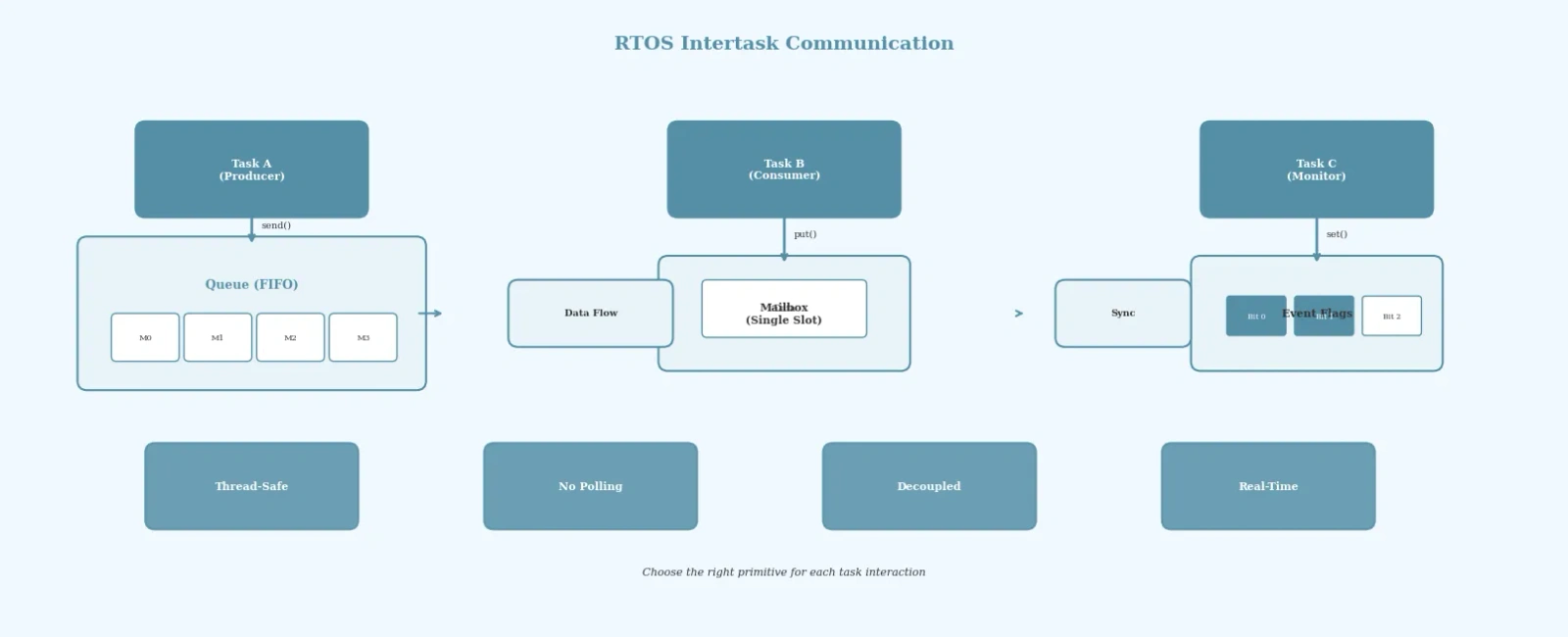
Table Of Contents
In any real-time operating system, tasks rarely work in isolation. They need to coordinate, synchronize, and share data with each other reliably. Intertask communication is the backbone of a well-architected embedded application, and choosing the right mechanism can make the difference between a responsive system and one plagued by race conditions and data corruption.
This article explores the most common RTOS intertask communication primitives — queues, mailboxes, event flags, and message passing — and provides practical guidance on when to use each one.
Why Intertask Communication Matters
Consider a typical embedded system with multiple tasks: one reads sensor data, another processes it, and a third sends results over a communication interface. The sensor task produces data that the processing task must consume, and the processing task generates results for the communication task. Without proper intertask communication, these tasks would either share global variables (leading to race conditions) or waste CPU cycles polling for data.
RTOS primitives solve this problem by providing thread-safe, kernel-managed channels for data exchange and synchronization.
Queues: The Workhorse of RTOS Communication
Queues are the most versatile intertask communication mechanism in any RTOS. A queue is a FIFO (First In, First Out) buffer that allows tasks to send and receive messages of a fixed size.
How Queues Work
The kernel maintains a buffer with a specified number of slots, each capable of holding a message of a defined size. Tasks can send messages to the queue (adding to the tail) or receive messages from the queue (removing from the head). If the queue is full, the sending task can either block (wait for space) or return an error. Similarly, if the queue is empty, the receiving task can block until a message arrives.
/* FreeRTOS queue example */QueueHandle_t sensorQueue;void sensorTask(void *pvParameters) {SensorData_t data;while (1) {data = readSensor();xQueueSend(sensorQueue, &data, portMAX_DELAY);vTaskDelay(pdMS_TO_TICKS(100));}}void processTask(void *pvParameters) {SensorData_t received;while (1) {xQueueReceive(sensorQueue, &received, portMAX_DELAY);processData(&received);}}void app_main(void) {sensorQueue = xQueueCreate(10, sizeof(SensorData_t));xTaskCreate(sensorTask, "Sensor", 2048, NULL, 2, NULL);xTaskCreate(processTask, "Process", 2048, NULL, 1, NULL);}
When to Use Queues
Use queues when you need to stream data between tasks, especially when the producer and consumer operate at different rates. Queues decouple tasks naturally — the producer does not need to know which task consumes the data, and multiple tasks can read from the same queue (though this turns it into a load-sharing design rather than a strict producer-consumer model and requires careful design).
Mailboxes: Single-Message Communication
A mailbox is a special case of a queue that holds exactly one message. When a new message is written to a mailbox that already contains data, the behaviour depends on the RTOS implementation - it may overwrite the old value, block, or fail.
Mailbox vs Queue
Mailboxes are ideal for scenarios where only the latest value matters. For example, if a task periodically updates a set of configuration parameters, a mailbox ensures the consumer always gets the most recent version without being burdened by stale intermediate values.
/* Conceptual mailbox usage */void configTask(void *pvParameters) {Config_t cfg;while (1) {updateConfig(&cfg);osMailPut(configMailbox, &cfg); /* Behaviour depends on RTOS (may block or fail if full) */osDelay(500);}}void controlTask(void *pvParameters) {Config_t *cfg;while (1) {cfg = osMailGet(configMailbox, osWaitForever);applyConfig(cfg);}}
The key advantage of mailboxes is their simplicity and low memory footprint. Since they store only one message, they are perfect for state updates, setpoint changes, and event notifications where only the latest data is relevant.
Event Flags: Lightweight Synchronization
Event flags (also called event groups or event registers) provide a lightweight mechanism for tasks to signal and wait on specific conditions. Each bit in an event flag register represents a distinct event, and tasks can wait for one or more bits to be set.
Event Flag Patterns
Event flags excel at scenarios where a task needs to wait for multiple conditions simultaneously. For instance, a data logging task might need to wait until both “SD card ready” and “new data available” flags are set before proceeding.
/* FreeRTOS event group example */EventGroupHandle_t systemEvents;#define SD_READY_BIT (1 << 0)#define DATA_READY_BIT (1 << 1)#define NETWORK_UP_BIT (1 << 2)void sdInitTask(void *pvParameters) {initializeSDCard();xEventGroupSetBits(systemEvents, SD_READY_BIT);vTaskDelete(NULL);}void sensorTask(void *pvParameters) {while (1) {readSensor();xEventGroupSetBits(systemEvents, DATA_READY_BIT);vTaskDelay(pdMS_TO_TICKS(200));}}void logTask(void *pvParameters) {EventBits_t needed = SD_READY_BIT | DATA_READY_BIT;while (1) {xEventGroupWaitBits(systemEvents, needed,pdTRUE, /* Clear bits after reading */pdTRUE, /* Wait for ALL bits */portMAX_DELAY);writeToSD();}}
Event Flags vs Semaphores
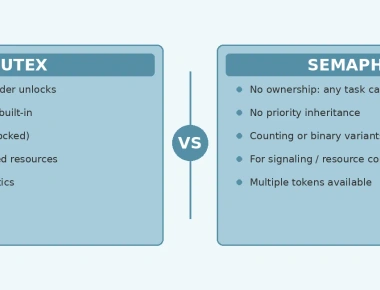
While binary semaphores provide simple signalling (signaled or not), counting semaphores can track multiple events or resources, while event flags can represent multiple independent conditions. Use event flags when a task needs to respond to combinations of events, and semaphores when you need simple binary signaling or resource counting.
Message Passing: Structured Communication
Some RTOS implementations provide a dedicated message passing mechanism that goes beyond simple queues. Message passing systems often support variable-length messages, priority-based delivery, and built-in memory management.
Priority Messages
In safety-critical systems, not all messages are equal. A message passing system with priority support ensures that urgent messages (such as fault notifications) are delivered before routine data updates. This prevents priority inversion at the communication level and ensures the system meets its real-time deadlines.
Choosing the Right Mechanism
Selecting the right intertask communication primitive depends on your specific requirements:
- Queues — Best for streaming data, producer-consumer patterns, and when message ordering matters.
- Mailboxes — Best for single-value updates where only the latest data is relevant.
- Event flags — Best for synchronization and signaling between tasks, especially when multiple conditions must be coordinated.
- Message passing — Best for complex systems requiring variable-length messages or priority-based delivery.
A common mistake is overusing shared global variables with semaphore protection. While this works for simple cases, it leads to tightly coupled code that is difficult to maintain and debug. RTOS primitives provide cleaner abstractions that make the system architecture explicit and verifiable.
Common Pitfalls
Queue overflow: Always handle the case where a queue is full. A blocked sender with an infinite timeout can cause a task to hang indefinitely if the consumer task is starved or has crashed.
Priority inversion in queues: When high-priority tasks wait on queues serviced by low-priority tasks, priority inversion can occur. Mitigate this by careful task priority design, and use priority inheritance where shared resources are protected by mutexes.
Event flag accumulation: Event flags are level-triggered — they remain set until explicitly cleared. Forgetting to clear bits can cause tasks to spin through their wait loop repeatedly.
Summary
Intertask communication is fundamental to building robust RTOS-based embedded systems. Queues provide reliable FIFO data streaming, mailboxes offer lightweight single-value updates, event flags enable flexible synchronization, and message passing supports complex communication patterns. By choosing the right primitive for each interaction, you create a system that is responsive, maintainable, and free from the subtle bugs that plague poorly synchronized multi-task applications.
Frequently Asked Questions
When should you use a queue vs event flags in an RTOS?
Use a queue to pass actual data packets (like sensor readings) between tasks. Use event flags (event groups) when a task needs to wait for simple status signals or logical combinations of events (e.g., Event A AND Event B).
What is the difference between a queue and a mailbox?
A queue is a FIFO (First-In, First-Out) structure where reading an item removes it. A mailbox holds a single message that can be overwritten by the sender and read multiple times by consumers without being consumed.
Are RTOS queues safe to share across multiple producer tasks?
Yes, standard RTOS queues manage internal thread-safety automatically. Multiple tasks can safely write to the same queue, and the RTOS scheduler suspends them in priority order if the queue becomes full.
Previous Article
Memory Protection Unit in Embedded SystemsRelated Posts

Rate Monotonic Scheduling and Schedulability Analysis in RTOS
June 22, 2026
5 min
RTOS Performance Profiling and Optimization Techniques
June 10, 2026
3 min
Quick Links
Legal Stuff