


Getting Started with Zephyr RTOS: A Practical Guide for Embedded Engineers
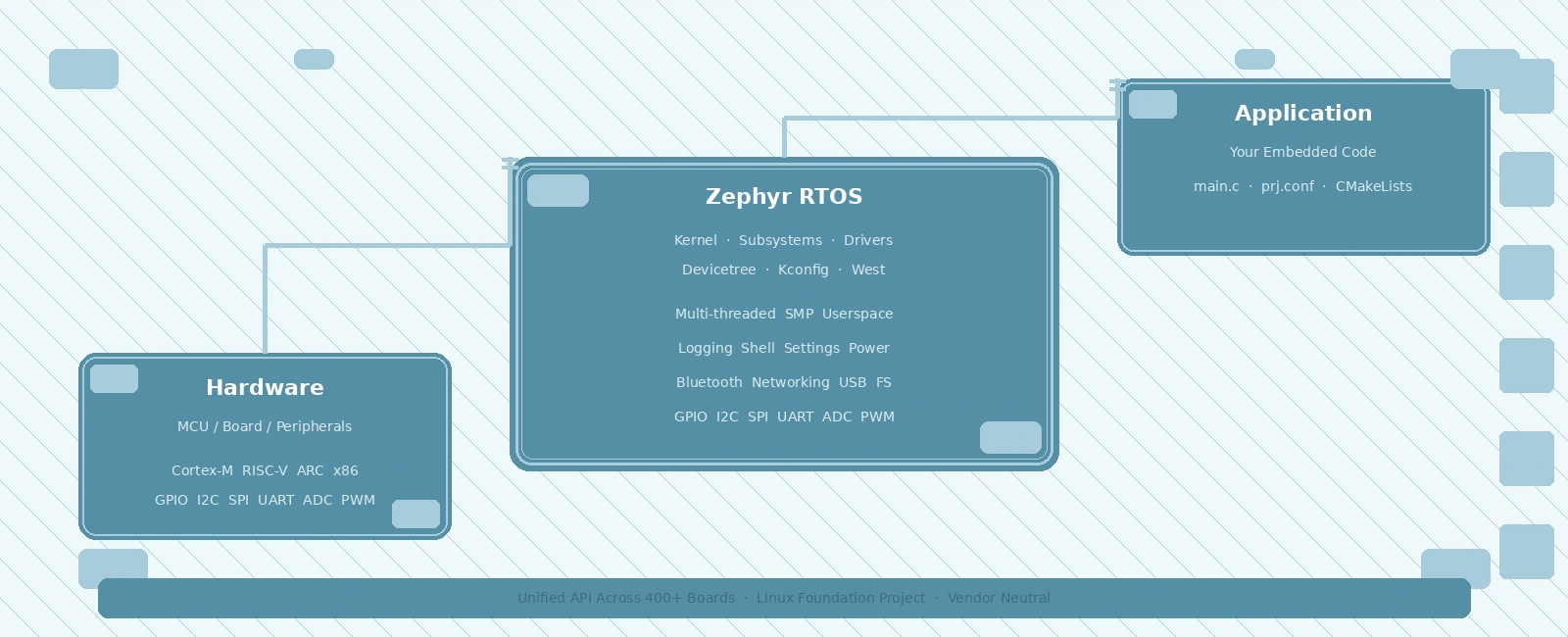
Table Of Contents
01
Setting Up the Development Environment
02
Understanding Zephyr's Architecture
03
Creating Your First Application
04
Building and Flashing
05
Devicetree Deep Dive
06
Kconfig Configuration System
07
Threads and Synchronization
08
Debugging and Profiling
09
Common Pitfalls and Solutions
10
Summary
11
Related Reading
12
References
13
Frequently Asked Questions
Zephyr RTOS has emerged as one of the most compelling choices for modern embedded development. Backed by the Linux Foundation and adopted by major silicon vendors including Nordic, NXP, STMicroelectronics, and Espressif, Zephyr offers a unified programming model across hundreds of hardware platforms. Unlike traditional RTOSes that require vendor-specific SDKs, Zephyr provides a single codebase with a consistent API whether you are targeting an ARM Cortex-M, RISC-V, x86, or ARC processor.
This guide walks you through setting up a Zephyr development environment, understanding its core concepts, and building your first application. We assume familiarity with embedded C and basic RTOS concepts (tasks, semaphores, interrupts).
Setting Up the Development Environment
Zephyr uses west as its meta-tool for repository management, building, and flashing. The recommended setup uses a Python virtual environment:
# Install west and dependenciespip3 install --user -U westexport PATH=~/.local/bin:$PATH# Initialize the Zephyr workspacewest init -m https://github.com/zephyrproject-rtos/zephyr --mr main ~/zephyrprojectcd ~/zephyrprojectwest update# Install Zephyr SDK (compilers, toolchains)west sdk install# Export Zephyr environmentcd zephyrsource zephyr-env.sh
The zephyr-env.sh script sets up ZEPHYR_BASE, PATH, and other variables. Add it to your shell profile for persistence.
Verifying the Installation
west build -b native_sim samples/hello_worldwest build -t run
The native_sim board runs Zephyr as a Linux process — perfect for quick iteration without hardware.
Understanding Zephyr’s Architecture
Zephyr’s architecture centers on three pillars:
- Kernel — Multi-threaded, priority-based preemptive scheduler with optional SMP support. Provides threads, work queues, timers, polling, and userspace isolation.
- Subsystems — Modular services: logging, shell, settings, power management, Bluetooth, networking (IPv4/IPv6, CoAP, MQTT), USB, filesystem (littlefs, FATFS), and more.
- Hardware Abstraction — Unified driver model via devicetree and Kconfig. Drivers implement standard APIs (GPIO, I2C, SPI, UART, ADC, PWM, etc.) so application code is portable.
+---------------------------+| Application |+---------------------------+| Zephyr Kernel / OS || (scheduler, IPC, mem) |+---------------------------+| Subsystems || (logging, net, usb, ...) |+---------------------------+| Driver APIs / HAL |+---------------------------+| Devicetree / Kconfig |+---------------------------+| Hardware |+---------------------------+
Creating Your First Application
Zephyr applications live outside the kernel tree. A minimal app structure:
my_app/├── CMakeLists.txt├── prj.conf├── src/│ └── main.c└── boards/└── <board>.overlay (optional devicetree overlay)
CMakeLists.txt
cmake_minimum_required(VERSION 3.20.0)find_package(Zephyr REQUIRED HINTS $ENV{ZEPHYR_BASE})project(my_zephyr_app)target_sources(app PRIVATE src/main.c)
prj.conf (Kconfig Configuration)
CONFIG_PRINTK=yCONFIG_SERIAL=yCONFIG_GPIO=y
src/main.c
#include <zephyr/kernel.h>#include <zephyr/device.h>#include <zephyr/drivers/gpio.h>#include <zephyr/logging/log.h>LOG_MODULE_REGISTER(main, LOG_LEVEL_INF);#define SLEEP_TIME_MS 1000static const struct gpio_dt_spec led = GPIO_DT_SPEC_GET(DT_ALIAS(led0), gpios);int main(void){int ret;if (!gpio_is_ready_dt(&led)) {LOG_ERR("LED device not ready");return 0;}ret = gpio_pin_configure_dt(&led, GPIO_OUTPUT_ACTIVE);if (ret < 0) {LOG_ERR("Failed to configure LED (err %d)", ret);return 0;}while (1) {gpio_pin_toggle_dt(&led);LOG_INF("LED toggled");k_msleep(SLEEP_TIME_MS);}return 0;}
Key observations:
- Devicetree aliases (
DT_ALIAS(led0)) abstract board-specific pin mappings - GPIO_DT_SPEC_GET extracts port/pin/flags from devicetree at compile time
- Logging uses
LOG_MODULE_REGISTERandLOG_INF/LOG_ERRmacros - Kernel APIs (
k_msleep) are prefixed withk_
Building and Flashing
# Navigate to your application directorycd ~/zephyrproject/my_app# Build for a specific board (e.g., STM32 Nucleo-F401RE)west build -b nucleo_f401re# Flash using openocd (adjust for your probe)west flash --runner openocd# Or use J-Linkwest flash --runner jlink
The west build command creates a build/ directory, with final binaries located in build/zephyr/ (e.g., zephyr.elf, zephyr.bin, and zephyr.hex).
Devicetree Deep Dive
Devicetree (.dts/.dtsi) describes hardware topology. Zephyr uses it to:
- Map peripherals to memory addresses
- Define pin muxing and GPIO assignments
- Bind drivers to compatible strings
Example: STM32 GPIO Node
/ {aliases {led0 = &user_led;};leds {compatible = "gpio-leds";user_led: led_0 {gpios = <&gpioa 5 GPIO_ACTIVE_HIGH>;status = "okay";};};};
The compatible property in a node (such as compatible = "gpio-leds" on the container node, or compatible = "st,stm32-gpio" on the underlying GPIO controller) matches a driver’s DT_DRV_COMPAT macro in the C source code, instructing the kernel to bind the correct driver to that hardware node.
Overlays
Board overlays (.overlay) extend or modify the base board devicetree without touching vendor files:
/ {aliases {my_sensor = &i2c_sensor;};};&i2c1 {status = "okay";i2c_sensor: sensor@76 {compatible = "bosch,bme280";reg = <0x76>;status = "okay";};};
Specify the overlay during your build using the -- CMake argument separator:
west build -b nucleo_f401re -- -DDTC_OVERLAY_FILE=boards/my_overlay.overlay
Kconfig Configuration System
Kconfig manages compile-time feature selection. Each symbol (CONFIG_FOO) controls code inclusion.
Common Configuration Patterns
# Enable shell for interactive debuggingCONFIG_SHELL=yCONFIG_SHELL_BACKEND_SERIAL=y# LoggingCONFIG_LOG=yCONFIG_LOG_MODE_IMMEDIATE=yCONFIG_LOG_DEFAULT_LEVEL=3# Thread stack sizesCONFIG_MAIN_STACK_SIZE=2048CONFIG_IDLE_STACK_SIZE=512# Enable specific driversCONFIG_I2C=yCONFIG_SPI=yCONFIG_ADC=y
Use west build -t menuconfig for interactive configuration.
Threads and Synchronization
Zephyr threads are created with k_thread_create() or the simpler K_THREAD_DEFINE() macro:
#define STACK_SIZE 1024#define PRIORITY 5K_THREAD_STACK_DEFINE(my_stack, STACK_SIZE);struct k_thread my_thread;void my_thread_entry(void *p1, void *p2, void *p3){while (1) {// Do workk_msleep(100);}}int main(void){k_thread_create(&my_thread, my_stack, K_THREAD_STACK_SIZEOF(my_stack),my_thread_entry, NULL, NULL, NULL,PRIORITY, 0, K_NO_WAIT);k_thread_name_set(&my_thread, "worker");return 0;}
Synchronization Primitives
| Primitive | API | Use Case |
|---|---|---|
| Semaphore | k_sem_init, k_sem_take, k_sem_give | Counting, ISR-to-thread signaling |
| Mutex | k_mutex_init, k_mutex_lock, k_mutex_unlock | Mutual exclusion, priority inheritance |
| Message Queue | k_msgq_init, k_msgq_put, k_msgq_get | Fixed-size data passing |
| Event | k_event_init, k_event_post, k_event_wait | Bitmask signaling |
| Poll | k_poll, k_poll_signal | Multi-object waiting |
Debugging and Profiling
Logging
Zephyr’s logging subsystem supports multiple backends (UART, RTT, network). At runtime:
LOG_INF("Temperature: %d°C", temp);LOG_HEXDUMP_INF(buf, len, "RX data:");
Filter per-module at build or runtime: CONFIG_LOG_DEFAULT_LEVEL=4 or log enable/disable <module>.
Shell
Enable CONFIG_SHELL=y for an interactive CLI over UART/USB. Built-in commands: kernel threads, kernel stacks, devices, drivers. Add custom commands:
static int cmd_mycmd(const struct shell *sh, size_t argc, char **argv){shell_print(sh, "Hello from custom command!");return 0;}SHELL_CMD_REGISTER(mycmd, NULL, "My custom command", cmd_mycmd);
Thread Analysis
# In shellkernel threadskernel stacks
Shows thread name, priority, stack usage, and state.
Common Pitfalls and Solutions
| Issue | Cause | Fix |
|---|---|---|
Build fails: DT_ALIAS not found | Alias missing in devicetree | Add alias in board overlay or check spelling |
| GPIO not toggling | Pin not configured / wrong port | Verify gpio_is_ready_dt() and gpio_pin_configure_dt() |
| Stack overflow | Stack too small for call depth | Increase CONFIG_MAIN_STACK_SIZE or thread stack |
| Symbol undefined | Missing CONFIG_* in prj.conf | Enable required Kconfig symbols |
| West flash fails | Probe not connected / wrong runner | Check west flash --help for runner options |
Summary
Zephyr RTOS provides a powerful, vendor-neutral foundation for embedded development. Its devicetree-based hardware abstraction, Kconfig build system, and rich subsystem library reduce porting effort across hardware platforms. The learning curve is steeper than bare-metal or simpler RTOSes, but the payoff is substantial: write once, run on hundreds of boards, with professional-grade tooling and community support.
Start with native_sim to learn the APIs, then move to your target hardware. Invest time in understanding devicetree overlays and Kconfig — they are the keys to unlocking Zephyr’s portability.
Related Reading
- RTOS Concepts: Tasks, Semaphores, and Mutexes
- FreeRTOS Message Buffers and Stream Buffers
- Interrupt Handling and ISRs in Embedded Systems
References
- Zephyr Project Documentation, “Getting Started Guide”, https://docs.zephyrproject.org/latest/develop/getting_started/index.html
- Zephyr Project Documentation, “Devicetree Guide”, https://docs.zephyrproject.org/latest/build/dts/index.html
- Zephyr Project Documentation, “Kconfig Guide”, https://docs.zephyrproject.org/latest/build/kconfig/index.html
- Zephyr Project Documentation, “Kernel Services”, https://docs.zephyrproject.org/latest/kernel/index.html
- Linux Foundation, “Zephyr RTOS Project”, https://zephyrproject.org/
- Zephyr Project Documentation, “West (Zephyr’s meta-tool)“, https://docs.zephyrproject.org/latest/develop/west/index.html
Frequently Asked Questions
What is Zephyr RTOS and why should I use it?
Zephyr is a scalable, open-source RTOS designed for resource-constrained devices. It supports hundreds of boards, provides a unified API across architectures, and is backed by the Linux Foundation with strong industry adoption.
How does Zephyr differ from FreeRTOS?
Zephyr offers a richer kernel feature set (multi-threaded, SMP, userspace), a hardware abstraction layer via devicetree, and a Linux-like build system (west + CMake + Kconfig). FreeRTOS is lighter and simpler for basic single-core applications.
What is the west tool in Zephyr?
West is Zephyr's meta-tool that manages multiple repositories, handles building, flashing, and debugging. It wraps CMake and provides a unified CLI for common development tasks across the Zephyr ecosystem.
Do I need to learn devicetree to use Zephyr?
Yes. Devicetree is Zephyr's hardware description language. It defines hardware topology, peripheral addresses, and driver bindings. Understanding devicetree overlays is essential for board bring-up and custom hardware support.
Can I run Zephyr on my existing STM32 board?
Most likely yes. Zephyr supports a vast range of STM32 boards out of the box. Check the boards/ directory in the Zephyr repo for your specific MCU/board. If not listed, you can create a board definition using devicetree and Kconfig.
Related Posts
Rate Monotonic Scheduling and Schedulability Analysis in RTOS
June 22, 2026
5 min
Watchdog Timers in Embedded Systems
June 17, 2026
3 min
RTOS Performance Profiling and Optimization Techniques
June 10, 2026
3 min
Quick Links
Legal Stuff