

FreeRTOS Heap Implementations Compared: Heap_1 to Heap_5
July 14, 2026
5 min
Embedded systems operate in environments where a software hang or an unexpected fault can have serious consequences — from a frozen industrial controller to a malfunctioning medical device. Unlike desktop applications, there is often no user to notice the problem and restart the system. The watchdog timer is the hardware safety net that ensures a misbehaving system recovers autonomously.
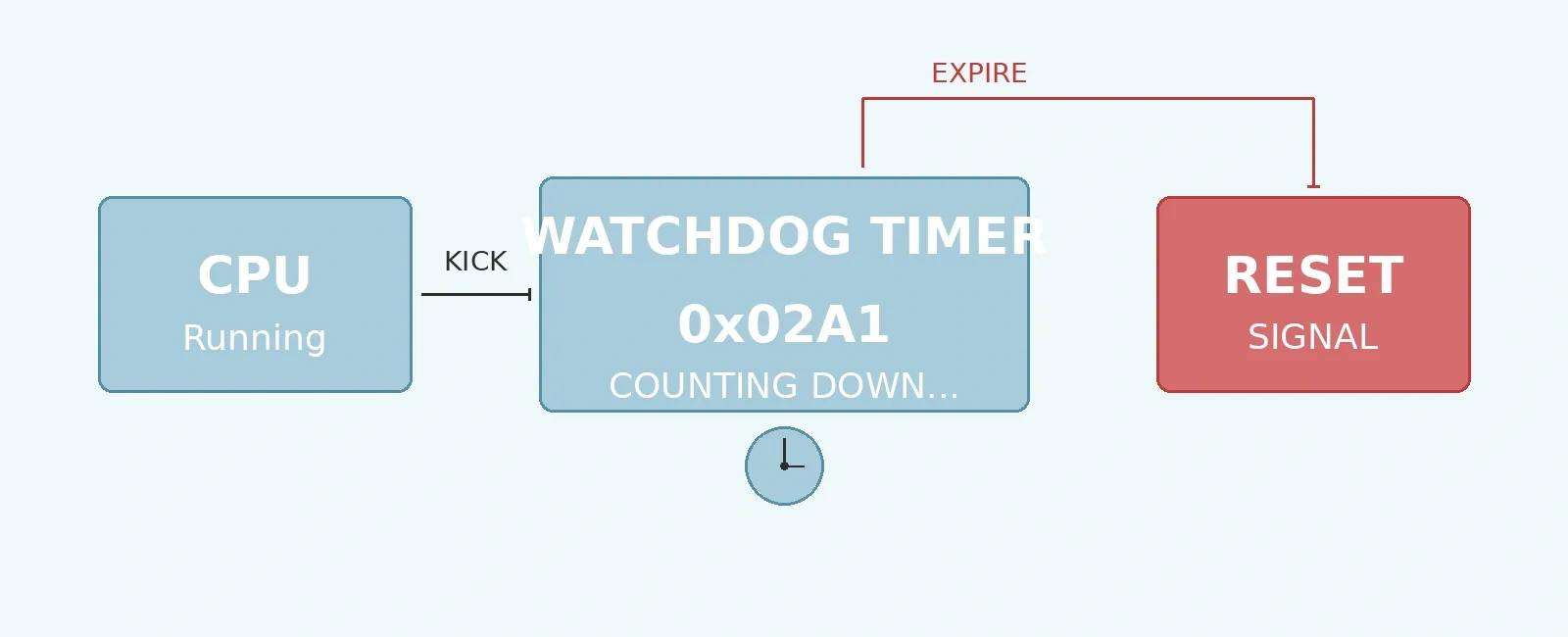
A watchdog timer is a hardware counter that, if not periodically serviced (or “kicked”) by software, triggers a system reset. It is one of the simplest yet most effective reliability mechanisms available to embedded engineers.
The concept is straightforward: a hardware counter counts down from a programmed value toward zero. Software must periodically write a specific value (or sequence) to the watchdog’s service register before the counter reaches zero. If the counter reaches zero — meaning software failed to service it in time — the watchdog asserts a reset signal to the processor.
This creates a contract between software and hardware: “If I am running correctly, I will kick you before you expire. If I fail, reset me.”
+---------------------------------------------------+| Watchdog Timer Lifecycle |+---------------------------------------------------+| || Program Set Software Timer || Timeout --> Counter --> Kicks --> Reloaded || || Timer RESET || Expires ------------------------------> CPU || (no kick) |+---------------------------------------------------+
The timeout period is configurable and depends on the application. A motor controller might use a 10 ms watchdog, while a data logger could use several seconds. The key principle: the timeout must be long enough to accommodate the worst-case normal execution time, but short enough to meet safety requirements.
Many microcontrollers feature a watchdog that runs from its own dedicated low-speed internal oscillator. This means it continues counting even if the main system clock fails — a critical advantage for detecting catastrophic clock-related faults.
On STM32 devices, this is called the Independent Watchdog (IWDG) and is clocked by the LSI (32 - 40 kHz). It is enabled by writing to the KR register with the key value 0xCCCC. Once enabled, it cannot be disabled by software — only a full system reset turns it off. This makes it a true last line of defense.
// Enable STM32 IWDG with ~1 second timeout (at 32 kHz LSI)void iwdg_init(void) {IWDG->KR = 0x5555; // Enable register accessIWDG->PR = 0x03; // Prescaler /32IWDG->RLR = 1000; // Reload value (~1s at 32kHz/32)while (IWDG->SR != 0); // Wait for registers to updateIWDG->KR = 0xAAAA; // Reload (kick)IWDG->KR = 0xCCCC; // Start the watchdog}
The window watchdog adds a second constraint: you must kick the watchdog within a specific time window — not too early and not too late. Kicking it before the window opens also triggers a reset. This catches not only hung software but also software running too fast (e.g., stuck in a tight loop).
+------------+==================+------------+| Too Early | Valid Window | Too Late || (RESET) | (Kick Here) | (RESET) |+------------+==================+------------+^ ^ ^Counter = Window Counter =Max Opens 0x3F (expires)
Some systems use an external watchdog IC (like the MAX6369 or TPS3823) connected to a GPIO pin. The MCU must toggle the GPIO within the timeout period. If the MCU fails to toggle, the external IC asserts the reset line. External watchdogs add independence — they work even if the MCU’s internal peripherals are malfunctioning.
In a bare-metal superloop, kicking the watchdog is simple: call the kick function at the end of the main loop. In an RTOS-based system with multiple tasks, the strategy requires more thought.
The most robust approach uses a high-priority monitor task that checks the health of all critical tasks before kicking the watchdog. Each critical task periodically signals the monitor (via a task notification, flag, or heartbeat counter). The monitor only kicks the watchdog when all tasks have reported in.
// Monitor task: only kick watchdog when all tasks are healthyvoid watchdog_monitor_task(void *pvParameters) {EventBits_t task_heartbeats;for (;;) {// Wait up to 500ms for all task heartbeat bits to be settask_heartbeats = xEventGroupWaitBits(watchdog_event_group,ALL_TASKS_HEALTHY, // e.g., (TASK1_BIT | TASK2_BIT | TASK3_BIT)pdTRUE, // Clear bits on exitpdTRUE, // Wait for ALL bitspdMS_TO_TICKS(500));if ((task_heartbeats & ALL_TASKS_HEALTHY) == ALL_TASKS_HEALTHY) {IWDG->KR = 0xAAAA; // Kick the watchdog (STM32)}// If not all tasks reported, do NOT kick -- let watchdog expire}}
Some RTOS kernels provide built-in watchdog support. FreeRTOS, for example, can be extended with task-level monitoring where each task registers a callback and expected execution bounds. The monitor checks each task’s actual execution against its declared bounds.
Initialization Delays: If the watchdog is enabled early (e.g., via hardware option bytes) but system initialization (like clock configuration or memory zeroing) takes longer than the timeout period, the watchdog will expire before the main application or RTOS even starts. This leads to an infinite boot-loop. Ensure you kick the watchdog during lengthy initialization routines.
Kicking from interrupt context: Kicking the watchdog from a high-priority ISR masks task-level hangs. The ISR will keep the watchdog fed even if your critical tasks are stuck. Always kick from task context.
Inconsistent kick intervals: If your main loop has variable execution time, ensure the worst-case loop time is less than the watchdog timeout. Account for interrupt latency and any critical sections that might delay the kick.
In functional safety standards like IEC 61508 (industrial) and ISO 26262 (automotive), watchdog timers are often mandatory. These standards typically require:
For SIL 2 / ASIL B and above, a single watchdog is usually insufficient. A common architecture uses a window watchdog fed by a high-priority safety task, backed by an independent watchdog as a last resort.
Watchdog timers are a fundamental reliability mechanism in embedded systems. They provide automatic recovery from software faults with minimal hardware cost. Key takeaways:
A well-implemented watchdog strategy turns a system crash into a brief, automatic recovery — the difference between a product that works in the lab and one that works in the field.
Quick Links
Legal Stuff