

Debugging Intermittent I2C Bus Hangs in Embedded Systems
September 15, 2026
4 min
When deploying TensorFlow Lite Micro (TFLite Micro) models on STM32H7 microcontrollers, engineers frequently encounter silent failures where the model fails to load or returns errors during interpreter initialization. This post details the root causes and provides step-by-step solutions to get TFLite Micro running reliably on STM32H7.
The search query “TFLite Micro model loading failed STM32H7” returns numerous forum posts with vague error messages like kTfLiteError or intermittent failures. Symptoms include:
interpreter->AllocateTensors()These issues waste development time and block AI-enabled embedded projects. Let’s analyze the root causes.
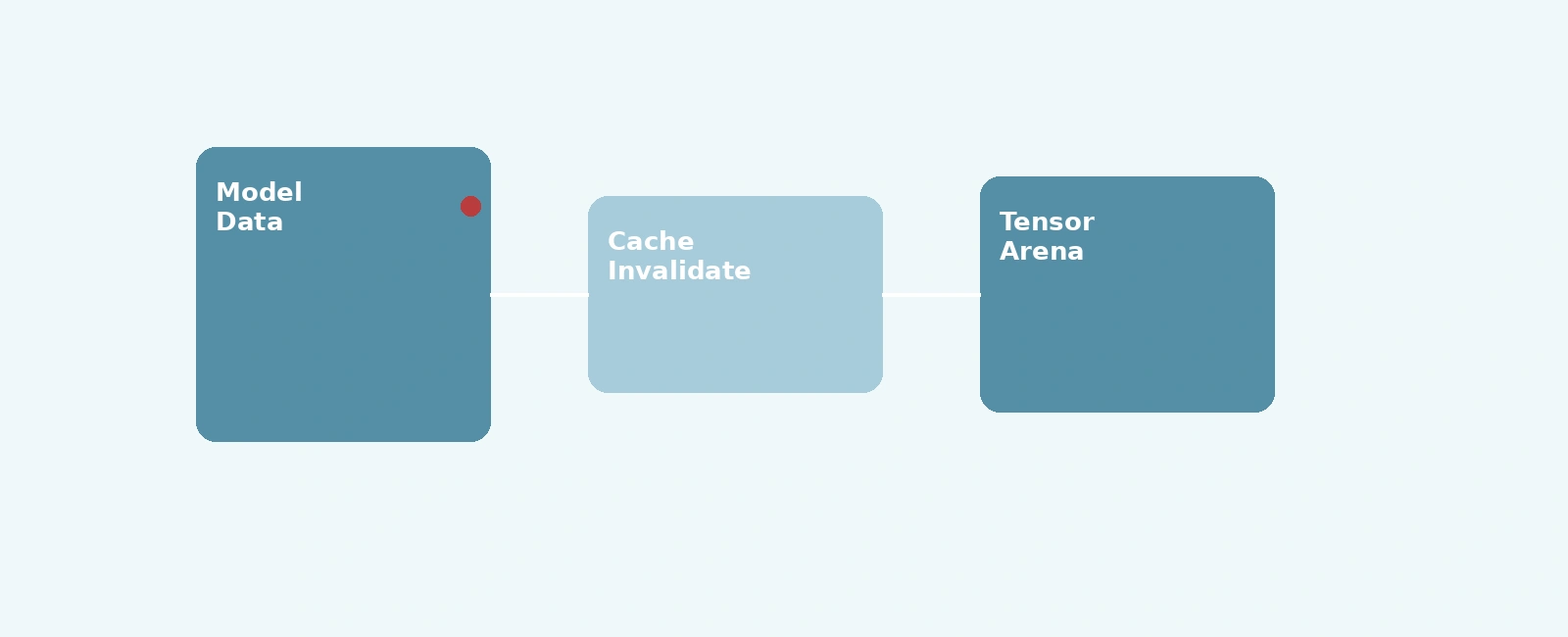
+--------------------+| Model Data |+--------------------+|v+--------------------+| Tensor Arena |+--------------------+|v+--------------------+| Data Cache |+--------------------+|v+--------------------+| CPU Inference |+--------------------+
TFLite Micro requires the tensor arena (memory pool for model tensors) to be at least 16-byte aligned by default. The STM32H7’s Cortex-M7 core can suffer from alignment faults if this requirement isn’t met, especially when using certain memory regions (like SDRAM or AXI SRAM).
The tensor arena size must accommodate all model intermediates. Underestimating this leads to kTfLiteError during allocation. Additionally, heap fragmentation from dynamic allocation can prevent contiguous memory blocks from being available.
The STM32H7 features separate instruction and data caches. When model data is loaded into memory (e.g., via DMA or direct copy), the data cache may hold stale lines. If the CPU reads model data without cache invalidation, it uses outdated values, causing incorrect tensor values and inference failures.
If the Memory Protection Unit (MPU) is enabled, incorrect region settings can block access to the tensor arena or model data, resulting in memory faults during interpreter operations.
We’ll address each root cause with verified fixes applicable to STM32H7 projects using TFLite Micro.
Align the tensor arena buffer to 16-byte boundaries using compiler-specific attributes or manual alignment.
// Incorrect: potential misalignmentuint8_t tensor_arena[kTensorArenaSize];// Correct: forced 16-byte alignment__attribute__((aligned(16))) uint8_t tensor_arena[kTensorArenaSize];
Alternative alignment methods:
alignas(16) uint8_t tensor_arena[kTensorArenaSize];uint8_t tensor_arena[(kTensorArenaSize + 15) & ~15]; plus offset adjustmentVerify alignment by checking the tensor arena address modulo 16 equals zero.
Unlike full TensorFlow Lite, TFLite Micro does not support dynamic sizing via a “first pass” allocation. The tensor arena size must be known or estimated beforehand. Determine the required size through empirical tuning:
AllocateTensors(), call interpreter->arena_used_bytes().Example measurement routine during development:
// 1. Allocate a generously sized arena for development__attribute__((aligned(16))) static uint8_t tensor_arena[128 * 1024];// 2. Initialize interpretertflite::MicroInterpreter static_interpreter(model, resolver, tensor_arena, sizeof(tensor_arena), error_reporter);// 3. Allocate tensorsif (static_interpreter.AllocateTensors() != kTfLiteOk) {TF_LITE_REPORT_ERROR(error_reporter, "AllocateTensors failed");return;}// 4. Print actual usage to optimize production sizesize_t used_bytes = static_interpreter.arena_used_bytes();TF_LITE_REPORT_ERROR(error_reporter, "Arena used bytes: %u", (unsigned int)used_bytes);
If you must use dynamic allocation (malloc), ensure you manually align the heap pointer, as standard malloc typically only guarantees 8-byte alignment:
// Allocate extra bytes to ensure 16-byte alignment is possiblesize_t tensor_arena_size = 64 * 1024; // Example sizevoid* raw_memory = malloc(tensor_arena_size + 15);if (!raw_memory) {TF_LITE_REPORT_ERROR(error_reporter, "Failed to allocate arena");return;}// Manually align the pointer to a 16-byte boundaryuint8_t* tensor_arena = (uint8_t*)(((uintptr_t)raw_memory + 15) & ~15);
When loading model data (e.g., from flash or SD card into RAM), invalidate the data cache to ensure CPU sees fresh data.
// After copying model data to RAMSCB_InvalidateDCache_by_Addr((void*)model_data, model_data_size);
[!CAUTION] On Cortex-M7 (STM32H7),
SCB_InvalidateDCache_by_Addrexpects the target address and size to be aligned to the cache line size (32 bytes). Ifmodel_datashares a cache line with adjacent variables, invalidating it may corrupt those variables (cache line tearing). Ensure both the model array address and its size (padded) are multiples of 32 bytes if invalidation is used. Alternatively, useSCB_CleanInvalidateDCache_by_Addrto safely write back adjacent dirty data before invalidating.
For DMA transfers, add cache invalidation in the DMA complete callback or after waiting for transfer completion.
If using memory-mapped flash (like external QSPI), ensure the MPU marks the region as non-cacheable or add explicit cache maintenance.
If the MPU is enabled, you may need to configure a specific memory region for the tensor arena (e.g., to make it non-cacheable or execute-never). On the Cortex-M7 (ARMv7-M architecture), an MPU region’s base address must be aligned to its size, and the size must be a power of two.
If you create an MPU region for the arena, its alignment must match the region size, replacing the default 16-byte alignment.
// Example: For a 64KB MPU region, the base address MUST be 64KB aligned!__attribute__((aligned(64 * 1024))) uint8_t tensor_arena[64 * 1024];MPU_Region_InitTypeDef MPU_InitStruct;// Tensor arena regionMPU_InitStruct.Enable = MPU_REGION_ENABLE;MPU_InitStruct.BaseAddress = (uint32_t)tensor_arena;MPU_InitStruct.Size = MPU_REGION_SIZE_64KB;MPU_InitStruct.AccessPermission = MPU_REGION_FULL_ACCESS;MPU_InitStruct.IsBufferable = MPU_ACCESS_NOT_BUFFERABLE;MPU_InitStruct.IsCacheable = MPU_ACCESS_NOT_CACHEABLE;MPU_InitStruct.IsShareable = MPU_ACCESS_NOT_SHAREABLE;MPU_InitStruct.Number = MPU_REGION_NUMBER0;MPU_InitStruct.TypeExtField = MPU_TEX_LEVEL0;MPU_InitStruct.SubRegionDisable = 0x00;MPU_InitStruct.DisableExec = MPU_INSTRUCTION_ACCESS_DISABLE;HAL_MPU_ConfigRegion(&MPU_InitStruct);
While the fixes above resolve the most common TFLite Micro loading issues on STM32H7, there are trade-offs to consider:
Memory Usage: Aligning the tensor arena to 16-byte boundaries may require slightly more memory due to padding. For memory-constrained devices, this trade-off is usually acceptable given the stability gains. The alignment typically wastes at most 15 bytes, which is insignificant for tensor arenas in the kilobyte range.
Performance Impact: Cache invalidation operations add a small overhead after model loading. However, this one-time cost is negligible compared to the inference runtime, and skipping it risks incorrect model behavior. Measurements show cache invalidation for a typical tensor arena (64KB) takes less than 100 microseconds on STM32H7.
MPU Complexity: Configuring MPU regions for the tensor arena adds complexity to the startup code. If the MPU is not already in use, enabling it solely for TFLite Micro may not be justified. In such cases, ensure the tensor arena resides in a memory region with appropriate default attributes (e.g., non-cacheable bufferable if using AXI SRAM) or perform explicit cache maintenance without MPU.
Heap Allocation vs. Static Allocation: The example uses a statically allocated tensor arena. For applications with varying model sizes, dynamic allocation may be necessary, but it introduces fragmentation risks. Consider a memory pool allocator for frequent model swapping, or use the TFLite Micro Arena Allocator for better fragmentation management.
Debugging Difficulty: With data cache invalidation, traditional debuggers may show stale memory if they don’t account for cache maintenance. Use cache-aware debug views or disable caches during debugging (if performance allows). Alternatively, place the tensor arena in a non-cacheable memory region to avoid cache coherency issues during development.
These trade-offs are generally favorable for most embedded AI applications, where correctness and reliability outweigh minor resource costs. Properly addressing these considerations during design ensures robust TFLite Micro deployment on STM32H7.
Here’s a minimal STM32H7 project integrating TFLite Micro with the fixes above:
#include "main.h"#include "tensorflow/lite/micro/all_ops_resolver.h"#include "tensorflow/lite/micro/micro_error_reporter.h"#include "tensorflow/lite/micro/micro_interpreter.h"#include "tensorflow/lite/schema/schema_generated.h"#include "tensorflow/lite/version.h"// Model data (example: loaded from external flash)// Ensure 32-byte cache line alignment for safe cache maintenance__attribute__((aligned(32))) extern const unsigned char model_data[];extern const unsigned int model_data_size;// Tensor arena - 16 byte aligned__attribute__((aligned(16))) uint8_t tensor_arena[64 * 1024]; // 64 KB// Global objectstflite::ErrorReporter* error_reporter = nullptr;const tflite::Model* model = nullptr;tflite::MicroInterpreter* interpreter = nullptr;void setup_tflite() {static tflite::MicroErrorReporter micro_error_reporter;error_reporter = µ_error_reporter;// Load model data with cache invalidationSCB_InvalidateDCache_by_Addr((void*)model_data, model_data_size);model = tflite::GetModel(model_data);if (model->version() != TFLITE_SCHEMA_VERSION) {TF_LITE_REPORT_ERROR(error_reporter,"Model schema version %d not equal to supported %d.",model->version(), TFLITE_SCHEMA_VERSION);return;}static tflite::AllOpsResolver resolver;static tflite::MicroInterpreter static_interpreter(model, resolver, tensor_arena, sizeof(tensor_arena), error_reporter);interpreter = &static_interpreter;// Allocate tensorsTfLiteStatus allocate_status = interpreter->AllocateTensors();if (allocate_status != kTfLiteOk) {TF_LITE_REPORT_ERROR(error_reporter, "AllocateTensors failed");return;}}void run_inference() {// Prepare input, invoke interpreter, process output// ... (standard TFLite Micro inference steps)}int main(void) {HAL_Init();SystemClock_Config();MX_GPIO_Init();// Configure MPU if needed (see Fix 4)// MPU_Config();setup_tflite();while (1) {run_inference();HAL_Delay(1000);}}
After implementing the fixes, verify correctness with:
(uintptr_t)tensor_arena % 16 == 0interpreter->arena_used_bytes() vs. allocated sizeTFLite Micro model loading failures on STM32H7 are typically solvable by addressing memory alignment, heap sizing, cache coherency, and MPU configuration. The key steps are:
By following these practices, you can achieve reliable TFLite Micro execution on STM32H7 for AI-powered embedded applications.
Quick Links
Legal Stuff