

Zephyr Workqueue API for Deferred Work in Embedded Systems
September 27, 2026
6 min
Zephyr RTOS provides a Memory Protection Unit (MPU) to enforce memory access controls, enhancing system reliability by preventing tasks from accessing unauthorized memory regions. Proper MPU configuration is essential for safety-critical embedded systems where memory corruption can lead to catastrophic failures. This article explains how to configure the Zephyr MPU, defines memory regions with appropriate permissions, and provides working code examples to protect critical system memory.
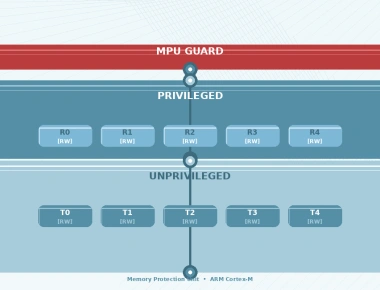
The Zephyr MPU abstraction layer provides a unified interface to configure hardware MPUs across different architectures (ARM Cortex-M, RISC-V, x86). The MPU divides the memory address space into regions, each with configurable base address, size, and access permissions (read, write, execute for privileged and unprivileged modes).
Each MPU region requires:
The number of available MPU regions is determined by the hardware (read from the MPU_TYPE register at runtime). For example, most Cortex-M4 devices provide 8 regions. Zephyr partitions these between kernel-reserved and application-configurable regions. On ARMv7-M, regions are matched in priority order (highest-numbered region wins on overlap), so overlapping regions require careful priority management.
Consider a scenario where multiple threads share memory resources without protection. A buggy thread could accidentally overwrite critical kernel data structures, stack of another thread, or read-only code sections, leading to unpredictable behavior, security vulnerabilities, or system crashes.
Without MPU protection:
First, enable MPU support in your Zephyr configuration:
CONFIG_ARM_MPU=yCONFIG_USERSPACE=y
Define your memory regions based on your application’s memory layout. Typical regions include:
Use the z_arm_mpu_configure_region() function (ARM Cortex-M) or architecture-specific equivalent to configure each region. The function takes region index, base address, size, and attribute flags.
Configure threads to run in privileged or unprivileged mode via thread creation options:
k_thread_create(&thread_data, thread_stack, K_THREAD_STACK_SIZEOF(thread_stack),thread_func, NULL, NULL, NULL,K_PRIO_COOP(7), 0, K_NO_WAIT);
To create an unprivileged thread, add K_USER to the thread options parameter:
k_thread_create(&thread_data, thread_stack, K_THREAD_STACK_SIZEOF(thread_stack),thread_func, NULL, NULL, NULL,K_PRIO_COOP(7), K_USER, K_NO_WAIT);
Finally, enable the MPU with z_arm_mpu_enable().
Here’s a complete example configuring the MPU for an STM32F407 Zephyr application:
#include <zephyr/kernel.h>#include <zephyr/arch/arm/aarch32/mpu/arm_mpu.h>/* MPU region table */static struct arm_mpu_region mpu_regions[] = {/* Region 0: Flash (code) - read only, privileged only */MPU_REGION_ENTRY("FLASH_0",0x08000000,REGION_FLASH_SIZE,REGION_RO_EXECUTE_PRIV),/* Region 1: SRAM - read/write, privileged and unprivileged */MPU_REGION_ENTRY("SRAM_0",0x20000000,REGION_SRAM_SIZE,REGION_RW_DATA_PRIV_U),/* Region 2: Peripherals - read/write, privileged only */MPU_REGION_ENTRY("PERIPHERALS",0x40000000,REGION_PERIPH_SIZE,REGION_RW_DEVICE_PRIV),/* Region 3: Background region - no access */MPU_REGION_ENTRY_BACKGROUND(REGION_NO_ACCESS)};void configure_mpu(void){/* Disable MPU during configuration */z_arm_mpu_disable();/* Configure MPU regions */for (int i = 0; i < ARRAY_SIZE(mpu_regions); i++) {z_arm_mpu_configure_region(&mpu_regions[i], i);}/* Enable MPU */z_arm_mpu_enable();}int main(void){configure_mpu();/* Create unprivileged thread */k_thread_create(&unpriv_thread_data, unpriv_thread_stack,K_THREAD_STACK_SIZEOF(unpriv_thread_stack),unpriv_thread_func, NULL, NULL, NULL,K_PRIO_COOP(7), K_USER, K_NO_WAIT);return 0;}
The MPU_REGION_ENTRY macros use predefined attribute constants:
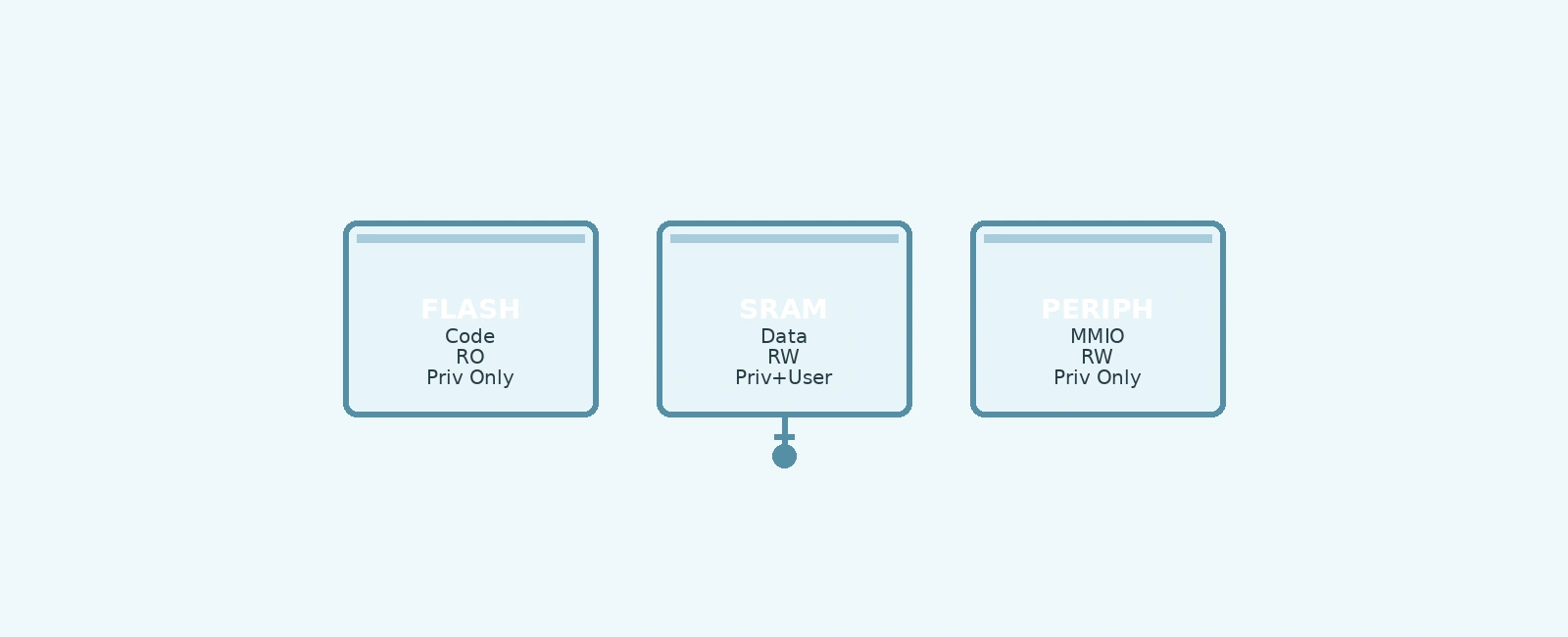
REGION_RO_EXECUTE_PRIV: Read-only and executable, privileged access onlyREGION_RW_DATA_PRIV_U: Read-write data, accessible by both privileged and unprivilegedREGION_RW_DEVICE_PRIV: Read-write device memory, privileged only (strongly ordered)REGION_NO_ACCESS: No access (triggers fault on any access)To verify your MPU configuration works correctly:
void unpriv_thread_func(void *p1, void *p2, void *p3){ARG_UNUSED(p1);ARG_UNUSED(p2);ARG_UNUSED(p3);/* Attempt to write to flash (should trigger MPU fault) */volatile uint32_t *flash_ptr = (uint32_t *)0x08000000;*flash_ptr = 0xDEADBEEF; /* This should cause a fault *//* If we reach here, MPU is not working correctly */printk("MPU test failed: write to flash succeeded\n");}
In Zephyr, the kernel’s built-in fault infrastructure handles MemManage faults automatically. Override k_sys_fatal_error_handler() to implement custom recovery or diagnostics:
void k_sys_fatal_error_handler(unsigned int reason, const struct arch_esf *esf){printk("Fatal error: reason %u\n", reason);printk(" MMFSR: 0x%02x\n", SCB->CFSR & 0xFF);if (SCB->CFSR & SCB_CFSR_MMARVALID_Msk) {printk(" Faulting address: 0x%08x\n", (unsigned int)SCB->MMFAR);}k_fatal_halt(reason);}
The following diagram illustrates typical MPU region configuration for a Zephyr application:
+--------------------------------------------------------------+| 0x08000000 - 0x080FFFFF || FLASH (Code Region) || Attributes: RO, Execute, Privileged Only |+--------------------------------------------------------------+| 0x20000000 - 0x2001FFFF || SRAM (Data Region) || Attributes: RW, Privileged & Unprivileged |+--------------------------------------------------------------+| 0x40000000 - 0x400FFFFF || PERIPHERALS (Memory-Mapped I/O) || Attributes: RW, Privileged Only, Strongly Ordered |+--------------------------------------------------------------+| 0x60000000 - 0x9FFFFFFF || BACKGROUND REGION (Default) || Attributes: NO ACCESS (Triggers Fault on Any Access) |+--------------------------------------------------------------+
For complex systems, basic MPU configuration may not be sufficient. Consider these advanced techniques:
In some applications, you may need to change MPU settings at runtime, for example, to temporarily grant access to a memory region for a specific operation. Zephyr allows dynamic reconfiguration of MPU regions, but care must be taken to ensure system stability.
To reconfigure an MPU region at runtime:
void reconfigure_mpu_region(int region_index, uint32_t base_addr, uint32_t size, uint32_t attr){/* Disable MPU during reconfiguration */z_arm_mpu_disable();/* Update the region configuration */struct arm_mpu_region region;region.base = base_addr;region.size = size;region.attr = attr;z_arm_mpu_configure_region(®ion, region_index);/* Re-enable MPU */z_arm_mpu_enable();}
Note: Disabling the MPU leaves the system unprotected during the reconfiguration window. Ensure that no memory access violations can occur during this critical section.
Zephyr’s memory domain API allows grouping memory partitions and assigning them to threads. When used with MPU, memory domains can provide an additional layer of flexibility.
However, note that memory domains are primarily for user mode threads and do not replace the need for proper MPU configuration for system memory.
Example of defining a memory domain and assigning a partition:
/* Define a memory partition */uint8_t __aligned(32) custom_buffer[256];K_MEM_PARTITION_DEFINE(custom_partition, custom_buffer,sizeof(custom_buffer),K_MEM_PARTITION_P_RW_U_RW);/* Initialize the memory domain with the partition */struct k_mem_partition *parts[] = { &custom_partition };struct k_mem_domain my_domain;k_mem_domain_init(&my_domain, ARRAY_SIZE(parts), parts);/* Assign the thread to the memory domain */k_mem_domain_add_thread(&my_domain, k_current_get());
When configuring MPU regions, it’s important to consider the cache attributes. Incorrect cache settings can lead to stale data or unexpected behavior.
For example, marking a region as cacheable when it should be device memory (non-cacheable) can cause issues with memory-mapped peripherals.
Always refer to the processor’s documentation for the correct cache and buffer settings for each memory region.
Configuring the Zephyr Memory Protection Unit (MPU) is a critical step in building robust and secure embedded systems. By defining memory regions with appropriate access permissions, you can:
The Zephyr MPU abstraction simplifies configuration across different architectures while providing fine-grained control over memory access permissions. Follow the step-by-step guide and code examples presented here to integrate MPU protection into your Zephyr-based applications, significantly enhancing system reliability and security.
Quick Links
Legal Stuff